Quality of Life Update: Voice Memos, Link Sharing & Content Gates
With this Quality of Life Update, we're making LearningSuite more personal, faster, and more enjoyable—for you, your team, and above all, your Members.
Because it's often not the big features that transform everyday work, but the many small moments: a personal voice message instead of a long text. A Lesson you can share with a single click.
Your Community gets Voice Memos, you can share individual Lessons via link, and use Content Gates to set up every Course launch with intention. Your AI Agents also respond faster and at a lower cost, while the entire platform loads noticeably faster.
Voice Memos: Your Community Can Hear You Now
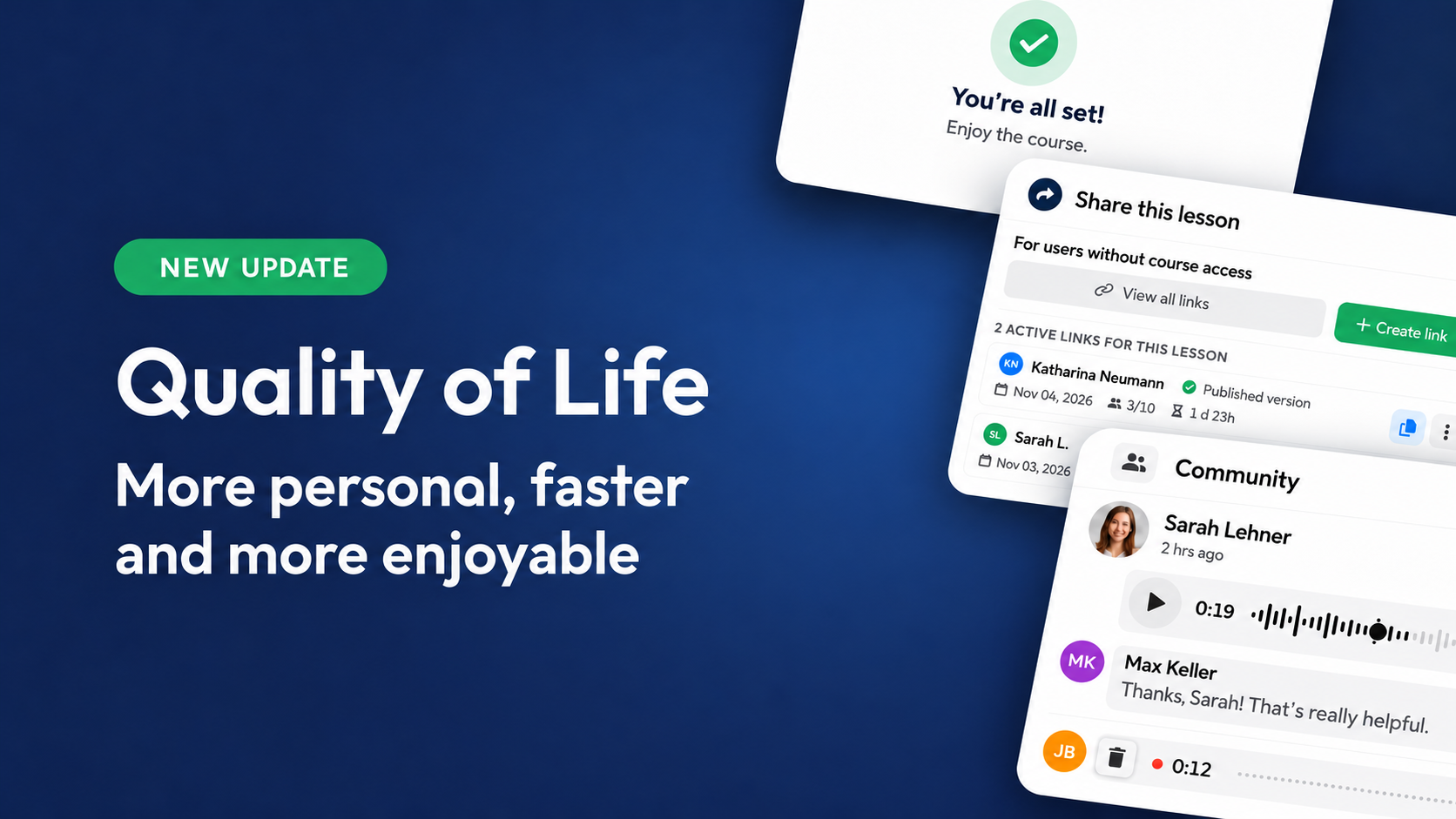
Text is quick to read, but a voice stays with you. With Voice Memos, your moderators—and, if you choose, your Members too—can now record and post messages directly in the Community, in posts, comments, and discussions.
A quick “Welcome, great to have you here!” in your own voice feels more personal than any text. Feedback sounds the way you mean it. And questions can be recorded in seconds on the go instead of typed out laboriously on a phone.

Recording couldn't be easier: tap the microphone, speak, post—no audio file and no extra steps. Your Members can listen to Voice Memos directly in the feed, comments, and discussions without downloading anything.
Because speaking is often easier than writing long texts, it's easier for people to join the conversation. The result: more connection, more exchange, and a more vibrant Community.
You Decide Who Can Speak
Under Community Settings → Post Rules → “Posting Options”, you decide who can post Voice Memos—separately for posts, comments, and discussions, and for moderators and Members. In the same area, you can now also decide who can create polls.
That way, you decide whether Voice Memos remain an exclusive channel for your team or let your entire Community join the conversation.

No Recording Gets Lost
Nothing is more frustrating than a great recording that simply disappears. That's why recordings are now more reliable everywhere—including audio submissions in Lessons.
If processing fails, the original recording uploads automatically. And if someone leaves the page before their recording is saved, they'll get a timely warning.
Ideas for Your Community:
- Voice feedback from the coach: Personal feedback in 30 seconds instead of long texts.
- Personal welcome: New Members hear your voice from day one.
- Questions on the go: Members simply record their question—wherever they are.
- Success stories: Members share their wins in their own voice and inspire others.
Link Sharing: Share Exactly the Lesson That Matters
Sometimes someone needs access to a single Lesson without seeing the entire Course. With Link Sharing, you can share individual Lessons with people who already have an account on your LearningSuite platform—even if they don't have access to the Course.
Give a Member access to exactly the right Lesson, or share the current editing status with a colleague to get feedback. You grant access to exactly the content the recipient should see.

You Stay Fully in Control
When you create a link, you decide how long it stays valid and how many people can use it. A countdown always shows you how long the link will remain active.
You also decide whether to share the published Lesson or the edited version with unpublished changes. Get feedback on a draft before your Members get to see it.
You can find every link across all Courses in the Link History, including its creator, validity, and access details. And when you no longer need a link, deactivate it with one click—immediately and permanently.

An Experience Just Like the Real Course
Recipients sign in to your platform and land directly in the shared Lesson. It looks like a regular Member page, complete with navigation and AI Agent, and is marked as a “read-only view.”
Your Content Stays Protected
Expired or deactivated links lead nowhere without revealing they ever existed. Videos, images, and files are only accessible through a valid link. Once it expires, no one can access your media anymore.
Content Gates: The Perfect Start to Every Course
First impressions matter—even in your Courses. With Content Gates, you show your Members a Pop-up before they open a Course for the first time. That way, you make sure important information reaches them before they get started.
Whether it's privacy notices, terms of participation, safety guidelines before practical exercises, or an onboarding form: the Member confirms the information or completes the form, then lands directly in the content. The Content Gate won't appear again for that Member.
Lead magnet Courses are another ideal use case for Content Gates: use a form to collect additional information before the free Course begins.

Learning Experiences That Feel Personal
Content Gates become especially powerful when you combine them with forms and AI. Ask about prior knowledge, goals, or your Members' roles, for example, then use that information to tailor content specifically to them.
With the new multi-page Pop-ups, you guide your Members through onboarding step by step—from the welcome and questions to the result. A loading spinner bridges short wait times, such as when AI calculates a Member Property from the answers: “We're putting together your personal learning path …”. And a Course banner shows your Member exactly what they can look forward to directly in the Pop-up.
These new options are also available in all your other Pop-ups.

Set Up in Just a Few Clicks
Create a Content Gate directly on the Course info page or in the new “Content Gates” tab next to your Pop-up overview. Ready-made templates, such as forms with or without an image, make getting started easy.
In the overview, you can see how often each Content Gate has been viewed and completed. And when you've created a Content Gate that works well, copy it to additional Courses with a single click.
AI Agents: Up to 35% Faster, Up to 50% Fewer Credits
No one likes waiting for an answer, and no one likes paying more than necessary. That's why we've optimized our AI Agents in many areas: credit consumption drops by up to 50%, and your Agents respond up to 35% faster in standard mode. For you, that means lower credit consumption and more answers for the same budget.
What's New for AI Agents:
- Real-time answers: Answers appear live while AI is writing, instead of only once they're complete.
- Less waiting: Up to three intermediate steps are eliminated per message, so answers start twice as fast on average.
- Actions without delays: The Agent launches forms or redirects immediately as soon as it knows they're needed.
- More from your credits: Searches per answer are meaningfully limited, unnecessary AI requests are eliminated, and Gemini models run on the latest generation.
- Always the right language: The Agent responds in your Members' language or the configured language, rather than in the language of the Course material.
- Chats at the click of a button: The admin overview of all chats opens instantly, even with more than 30,000 chats. Individual User chat lists also load noticeably faster.
Noticeably Faster Across the Entire Platform
Every second of loading time costs attention. That's why we've fine-tuned many things behind the scenes to make LearningSuite feel even smoother for your Members and your team.
What's Faster Now:
- Every page view: Pages load leaner because significantly less data needs to be requested in the background.
- Push notifications: Arrive faster, even when sent to many Members at once.
- Notification counter: The number on the bell appears instantly.
- Feedback overview: Submissions and the number of ungraded submissions load significantly faster. So you can start grading without waiting.
- Login statistics: Now load quickly even on large platforms.
Small Improvements, a Big Difference
Each of these updates takes a little work off your plate, your team's plate, or your Members' plate: one less click here, one second faster there, one more personal moment in your Community. Together, they make LearningSuite a platform where learning simply feels good.
We hope you enjoy the new features! If you have any questions, feel free to contact us directly through the HelpCenter.